Purchase Order Processing (POP) is one of the most operationally important workflows in procurement and finance, yet it remains highly manual in many organizations. The challenge is not only “reading” the PO, but reliably converting inconsistent vendor PDFs into structured data that is accurate enough to be posted into ERP systems.
In practice, POs arrive as PDFs with:
- inconsistent templates and vendor layouts
- varying scan quality
- missing or ambiguous fields
- mismatched vendor naming conventions (aliases, abbreviations, typos)
- complex line-item tables
Traditional OCR + rules-based systems typically require constant template maintenance and still struggle with variability. Modern vision-capable AI models can extract structured data far more flexibly—but enterprise systems still need determinism, reviewability, and controlled retraining.
This post describes a practical Proof of Concept (PoC) for AI-Assisted Purchase Order Processing, combining:
- Vision-based extraction (PDF → JSON using Python vLLM inference service)
- Deterministic orchestration (Spring Boot)
- Vendor detection and enrichment (exact match → alias lookup → embedding similarity)
- Human-in-the-loop review
- A controlled retraining loop that improves accuracy over time
Executive Summary
This PoC implements an end-to-end PO processing pipeline where PDFs are uploaded and queued for AI extraction, enriched using multi-tier vendor resolution, reviewed by a user, and then either approved for ERP posting or corrected and added to a retraining batch. Vendor matching is designed to improve immediately through alias updates, while long-term extraction accuracy improves through controlled retraining.
Key Highlights
- Vendor master is UI-managed (PoC) and typically ERP-synced in production
- Vendor embeddings are generated on the Spring Boot side using a Mini-LLM (not on the AI server)
- PDF ingestion is queue-driven and processed one-by-one to control load
- AI inference produces a fixed-schema JSON output
- Vendor resolution uses exact match → alias lookup → embedding + Euclidean distance
- Output moves to REVIEW, then branches into APPROVED or RETRAIN
- Retraining is explicitly triggered by the user and runs via:
Stop vLLM → Run training.py → Start vLLM
System Overview
The architecture is intentionally split into clear responsibilities:
1) Spring Boot Application (Control Plane)
The Spring Boot application provides:
- UI for vendor master management
- PO upload and ingestion controls
- MQ listener and orchestration logic
- vendor detection and JSON enrichment
- review workflow (approve / flag for retrain / edit JSON)
- retraining orchestration (stop inference → train → restart inference)
2) Python Inferencing Service (Data Extraction Engine)
A Python service served with vLLM performs:
- vision-based PO understanding
- extraction into a fixed JSON schema
3) Database (Truth Store)
Stores:
- vendor master records (name + vendor code)
- alias mappings
- vendor embedding vectors
- processing status and review state
- confidence metrics
4) Message Queue (Decoupling + Backpressure)
Used to ensure ingestion is controlled and scalable:
- one message per PO PDF
- listener processes one-by-one to avoid overload
5) Retraining Pipeline (Continuous Improvement)
Triggered explicitly by the user to prevent unexpected production behavior:
- stop inference service
- run training job
- restart inference service
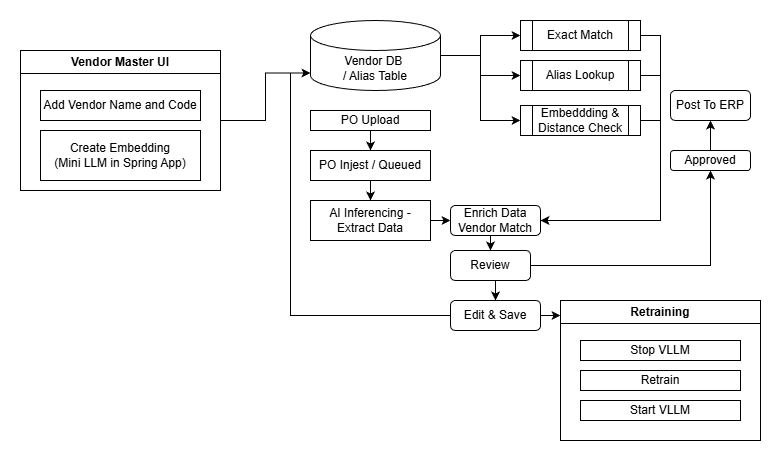
End-to-End Data Flow
At a high level, the system processes POs through these steps:
- Maintain vendor master data (PoC UI-based)
- Upload PO PDFs
- Queue ingestion events
- Extract data using AI inference (PDF → JSON)
- Enrich JSON using vendor matching logic
- Move to review state
- Approve or flag for retraining
- Edit and batch corrections
- Trigger controlled retraining
Vendor Master Data Management (PoC)
In a production system, vendor master data is typically synchronized from an ERP.
For this PoC, vendor master is managed through a simple UI.
Vendor Master UI Features
The user can create vendor master records with:
- Vendor Name
- Vendor Code
Vendor Embedding Generation (Spring Boot Side)
When a vendor record is added:
- an embedding vector is created using a Mini-LLM
- embedding generation runs on the Spring Boot application side, not on the AI server
This design choice provides two key advantages:
- Low latency vendor matching without involving GPU inference
- Deterministic control inside the application layer
PO Upload and Ingestion
Upload
The user uploads one or more PO PDF files using the PO upload UI.
Ingest / Queue
After upload, the user can view the list and trigger Ingest.
On ingestion:
- PDFs are moved into the incoming folder
- one message per file is pushed into the MQ INCOMING queue
MQ Listener: Controlled Processing
A listener consumes PO messages from the INCOMING queue.
Important behavior:
- messages are processed one-by-one (intentionally)
- this prevents sudden spikes in GPU load or inference backlog
For each queued PDF:
- The listener calls the Python inferencing service
- The PDF is passed to inference
- The inference service returns an extracted JSON (fixed schema)
AI Extraction: PDF → Fixed-Schema JSON
The Python inference service (vLLM-based) performs vision-based extraction and returns a structured JSON result.
This result is treated as extracted data, not final truth.
It must be validated and enriched before approval.
Vendor Resolution and JSON Enrichment
Once the AI returns JSON, the Spring Boot orchestration layer performs vendor resolution.
The extracted vendor name is processed through a deterministic multi-tier flow:
Tier 1: Exact Match
If the extracted vendor name exactly matches a record in the vendor master DB:
- the vendor code is resolved immediately
Tier 2: Alias Lookup
If no exact match exists:
- the system checks the alias table
- aliases represent known variations of vendor naming
Alias mappings are especially important because they allow the system to “learn fast” from corrections.
Tier 3: Embedding Match + Euclidean Distance
If alias lookup fails:
- generate an embedding vector for the extracted vendor name
- compute Euclidean distance against stored vendor embedding vectors
- if a close match is found, resolve the vendor code
Enrichment Output
Once vendor code is resolved:
- the JSON is enriched with
vendor_code - confidence scores are updated
Confidence Scoring
Two confidence signals are maintained:
- vendor_confidence: confidence of vendor identification/mapping
- overall confidence: confidence of end-to-end extracted PO quality
These can be used to prioritize review workloads, enforce business rules, and drive operational monitoring.
Review Workflow (Status = REVIEW)
After extraction and enrichment:
- status is updated to REVIEW
- PDF is moved to the review folder (PoC implementation)
Review UI
The user can review results in a list view:
- tabular output view
- clicking a file name opens the detailed page:
- PO PDF view
- extracted JSON view
Approval Workflow (REVIEW → APPROVED)
If all required attributes are populated:
- the Approve action becomes available
On approval:
- system checks whether alias update is required
- alias table is updated if needed
- status is set to APPROVED
- file is moved to the approved folder (
/po/approved/)
In practical terms, approval does two things:
- confirms correctness for downstream use
- immediately strengthens future automation through alias mapping updates
Retraining Workflow (REVIEW → RETRAIN → Batch)
If required attributes are missing or extraction quality is insufficient:
- user selects Flag for retrain
On flagging:
- status is set to RETRAIN
EDITED = FALSE- file is moved to the batch folder (
/po/batch/)
Batch Editing: Produce Corrected Training Examples
The user can open the batched list and edit individual entries.
The batch edit screen is designed for efficiency:
- left pane: PDF
- right pane: editable JSON
After edits are saved:
EDITED = TRUE
This creates high-quality corrected outputs that can be used to improve future extraction.
Controlled Retraining (Stop vLLM → Train → Start vLLM)
Retraining is explicitly triggered from the UI using Start retraining.
When retraining starts:
- Stop vLLM inference service (Python service)
- run
training.py - restart the vLLM inference service
This controlled lifecycle prevents resource contention and keeps the system operationally predictable.
Technology Stack Summary
This PoC is designed to be production-aligned, without being operationally heavy.
Application + Workflow Orchestration
- Spring Boot (UI + pipeline orchestration + enrichment)
Vendor Matching
- Mini-LLM embeddings generated on Spring Boot side
- Euclidean distance matching for similarity resolution
- Alias table for fast correction-based learning
Messaging
- MQ INCOMING queue
- sequential message consumption
AI Inference
- Python inference service served via vLLM
- vision-based PDF extraction into fixed-schema JSON
Storage
- DB: vendor master, aliases, embeddings, status, confidence
- folders for state transitions (
/incoming,/po/review,/po/approved,/po/batch)
Retraining
training.py- explicit user-triggered retraining pipeline
Closing Notes
This PoC demonstrates a practical pattern for enterprise AI workflows:
- AI handles high-variability extraction
- Spring Boot provides deterministic orchestration and governance
- users remain in control through review and approval
- corrections improve outcomes immediately (aliases) and over time (retraining)
The result is a PO processing system that is not only automated, but also auditable, operationally stable, and designed to get better with use.
Summary of the Stack
This architecture mirrors a production-grade enterprise deployment, balancing power (Vision) with efficiency (Semantics).
| Layer | Choice | Rationale |
| Orchestration | Java Spring Boot | Robust, type-safe, enterprise-ready control plane. |
| Vision Model | Qwen2-VL-7B-Instruct | State-of-the-art visual reasoning for reading documents. |
| Semantic Model | all-MiniLM-L6-v2 | Fast, local vector similarity for normalizing master data. |
| Inference | vLLM (Linux) & DJL (Windows) | Hybrid: Centralized GPU serving (Vision) vs. Embedded CPU execution (Logic). |
| Frontend | Thymeleaf + Local Assets | Secure, offline-capable, instant loading. |
| Database | MariaDB | Hybrid relational/JSON storage for structured audits. |
| Training | PEFT / LoRA | Efficient fine-tuning without retraining the full model. |
Note: DM me on LinkedIn for the source code.