At this stage, the AI has done its heavy lifting. It has “seen” the document, reasoned about its content, and provided a structured response. But in an enterprise environment, “high probability” is not enough. We need certainty.
This post details the Human-in-the-Loop interface—the cockpit where operations teams transition from data entry to exception management.
1. The Design Philosophy: Correction is Learning
In traditional systems, a human correcting an error is just “fixing a bug.” In our AI-assisted architecture, a human correcting an error creates an asset.
We have designed the UI to merge these two concepts. The operator doesn’t need to log into a separate “Data Science Portal” to train the model. Reviewing the purchase order is the process of training the model.
2. The Review Dashboard
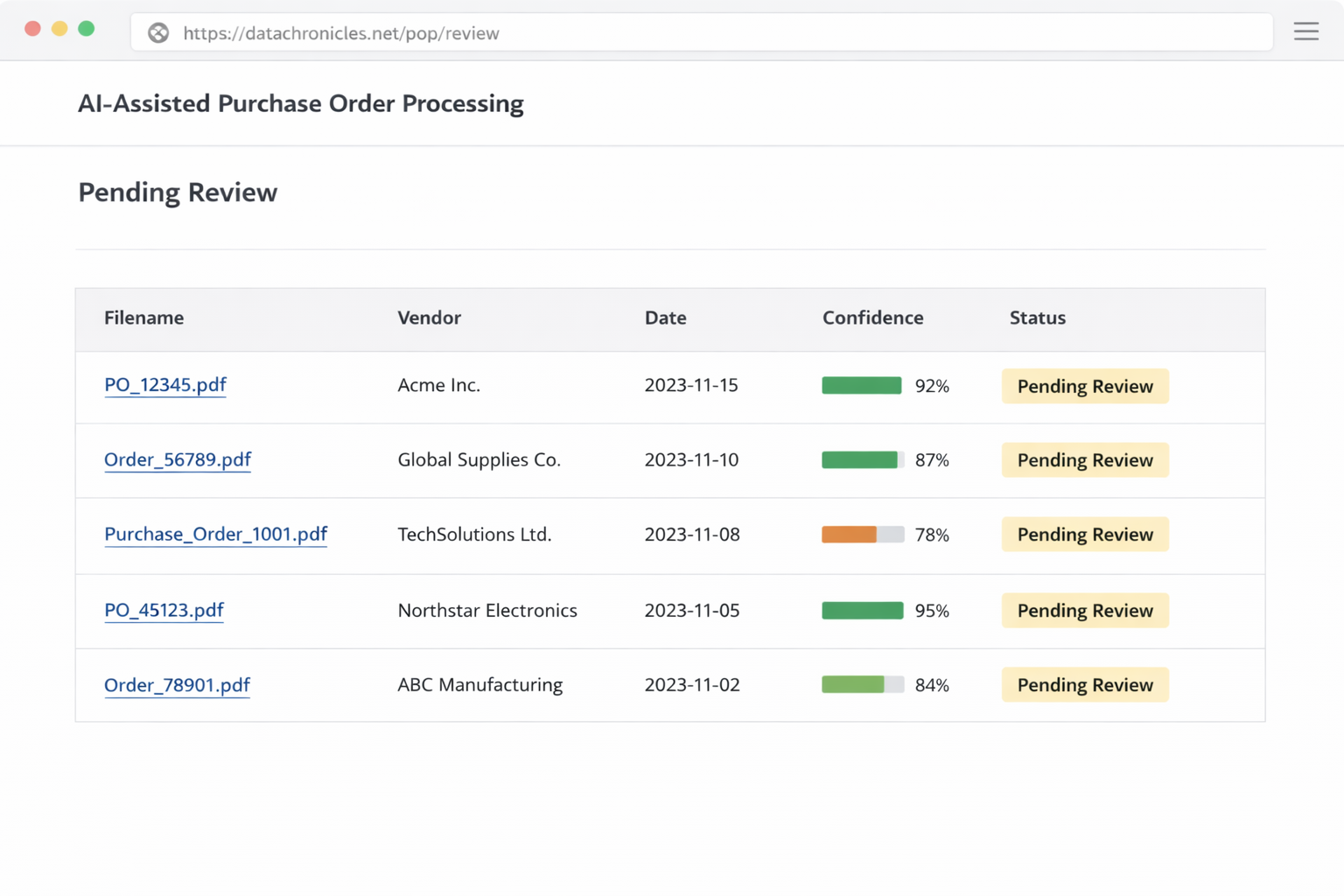
Users access the system via a streamlined dashboard at /pop/review.
Purpose: To provide a clear, prioritized worklist of exceptions.
The View:
- Filter: Defaults to
Status = NEEDS_REVIEW. - Columns: File Name, Vendor, Total Amount, Confidence Score, Error Reason (e.g., “Math Mismatch”, “New Vendor”).
- Action: Clicking any row opens the Decision Interface.
3. The Decision Interface (Split-Screen)
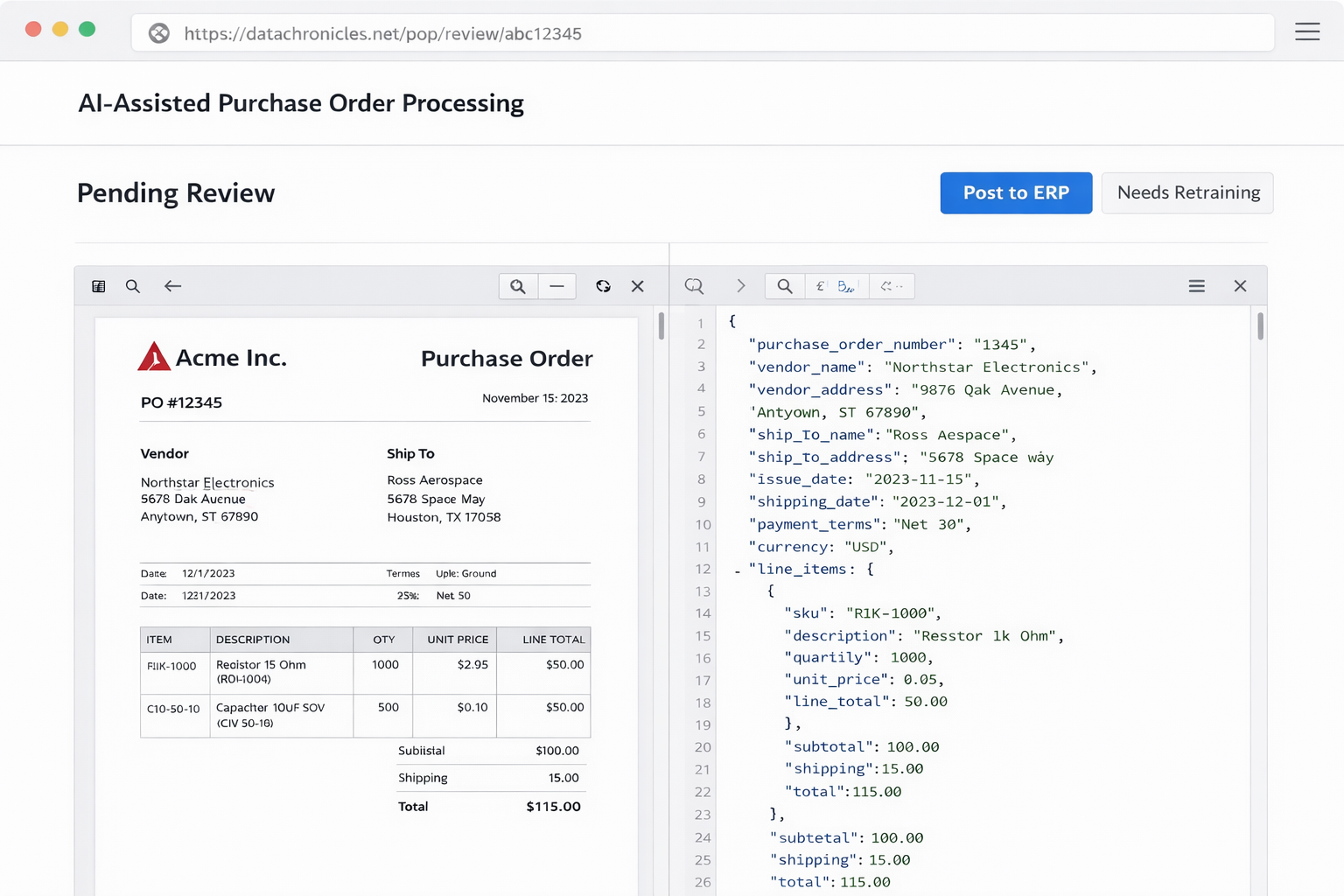
This is the heart of the application. It is designed for speed and context.
Layout:
- Left Pane (The Source): A high-resolution render of the original PDF (fetched from
/po/archive/). Pan and zoom capabilities are essential here. - Right Pane (The Data): A generated form populated with the AI’s extracted JSON.
- Visual Cues: Fields that failed validation (e.g., a date in the past) are highlighted in red.
The Workflow: The user compares the document on the left with the data on the right. If the AI missed a line item or misread a date, the user clicks the field and types the correct value.
4. The “Decision Fork.”
Once the data is correct, the user must “commit” the work. Unlike a standard “Save” button, our interface offers two distinct paths to reinforce the Active Learning strategy.
Path A: “Confirm & Post” (The Happy Path)
- When to use: The AI was 100% correct, or the error was trivial (e.g., a typo in the vendor address).
- System Action:
- Updates the status to
POSTED_TO_ERP. - Triggers the ERP Integration (Simulated).
- Removes the item from the dashboard.
- Updates the status to
Path B: “Correct & Retrain” (The Teaching Path)
- When to use: The AI failed structurally. (e.g., it completely missed the “Discount” column, or it treated the “Ship To” address as the “Vendor” address).
- System Action:
- Capture: The system saves the Corrected JSON alongside the Original Image into a specific “Golden Dataset.”
- Flag: Updates status to
RETRAIN_REQUIRED. - Post: Proceeds to post the corrected data to the ERP (business continuity is not delayed by training).
This distinction is vital. It keeps our training dataset clean, containing only meaningful corrections rather than noise.
5. ERP Integration (The Simulation)
For this Proof of Concept, we simulate the ERP posting to demonstrate the “Last Mile” connectivity.
When a user clicks “Confirm…”, the Spring Boot application sends a payload to a mock endpoint:
JSON
POST /erp/api/v1/purchase-order
{
  "source_doc_id": "sha256_hash...",
  "vendor_id": "VEND-001",
  "po_date": "2026-01-04",
  "line_items": [ ... ],
  "total_amount": 1500.00
}
In a real deployment, a POST to the ERP system.
6. The Retraining Execution
The “Retraining” phase is no longer a manual button press by the operator. It is a background batch process managed by the Model Retraining Service.
The Process:
- Accumulation: The system accumulates documents tagged as
RETRAIN_REQUIRED. - Batch Trigger: Once a threshold is met (e.g., 50 new examples), or a scheduled time occurs (e.g., Sunday 2 AM), the Retraining Service wakes up.
- Fine-Tuning: It uses the “Golden Dataset” (Image + Corrected JSON) to fine-tune the Qwen2-VL model.
- Deployment: The new model weights are swapped in.
By automating this, we ensure the system gets smarter every day, as a byproduct of the team’s everyday work.